
Blog · DevOps
What Is Jenkins — and Why One Button Beats a Release Checklist
What Jenkins is, what it is good for, and a real case: a customer portal on Kubernetes released in two minutes with one click.
Who in your company can release a new version of your website, customer portal or internal app? If the honest answer is “one developer, and the steps are only in their head”, every update is a small risk: a missed step, a wrong file, a release on Friday evening that nobody can undo. And when that person is on vacation, updates simply stop.
Jenkins is the tool that turns that checklist into one button. Below we explain, without jargon, what Jenkins is, what it is good for (and what it is not), and show a real project: a customer portal on Kubernetes that went from hand-made updates to a two-minute release with one click — and a one-click rollback.
Jenkins in plain words
Jenkins is free, open-source automation software. Think of it as a robot that follows a written recipe. You describe the steps once — “take the code, check it, build it, put it on the server, make sure the site opens” — and from then on Jenkins does them the same way every time.
- The recipe is a file (a Jenkinsfile) stored next to your code, so changes to the release process are reviewed and versioned like the code itself.
- The trigger is your choice: a button, a schedule (“every night at 2 AM”), or every new commit in GitHub.
- Everything is recorded: who started it, when, which version of the code, how long each step took and the full log. If something fails, you see exactly where.
- It runs on your own server — in the office or in the cloud — so your code and passwords do not have to leave your infrastructure.
Jenkins has been around since 2011 (it grew out of an earlier project called Hudson), is used by companies of every size, and has around two thousand plugins for GitHub, Docker, Kubernetes, Slack, email, Microsoft Teams and almost anything else.
What Jenkins is good for
| Task | Example | Why automate it |
|---|---|---|
| Releases (deploy) | Put a new version of the website or portal on the server | Same steps every time, anyone on the team can do it |
| Rollback | Return to the previous version in one click | A bad release costs minutes, not an evening |
| Tests | Run automated tests on every change | Bugs are caught before customers see them |
| Builds | Build an app, an installer or a container image | No “it works on my laptop” |
| Scheduled jobs | Nightly data sync, reports, backups with a check | A visible log instead of a forgotten cron on some server |
| Routine admin | Renew certificates, clean old files, check status | Fewer manual logins to production servers |
What Jenkins is not: it is not monitoring (for “is everything still working right now?” see our article on Grafana monitoring and alerts), not a place to store code (that is GitHub or GitLab), and it will not magically fix an app that has no tests — it runs the steps you give it.
Real case: a customer portal on Kubernetes
Our client, a logistics company, runs a customer portal where customers create shipments, pay and track parcels. The portal runs on a small Kubernetes cluster — two servers that run the app in containers.
Before
- The app was started by hand as a single container (“pod”), without the standard Kubernetes wrapper that keeps a history of versions. There was no clean way to roll back.
- An update meant a developer logging in to the production server as administrator and building the new version right there, step by step.
- Database passwords, payment keys and the SSL certificate were baked into the app image.
- No record of who released what and when. Only one person knew the steps.
What we did
- Put the app under proper Kubernetes management — a Deployment, which knows the current and previous versions and can roll back.
- Moved passwords and the certificate out of the image into a Kubernetes Secret, mounted read-only. They are no longer in the code or in the image.
- Installed Jenkins (LTS version) in a small Linux container on the company’s own Proxmox server in the office — not on the production cluster and not open to the internet.
- Created one release job with three actions: deploy (choose a branch), rollback and status. The recipe — the Jenkinsfile — lives in the same private GitHub repository as the code.
- Every release is named after the code version (the Git commit), so you always know exactly what is running. The last five versions are kept for rollback; older ones are cleaned up automatically.
- Added a smoke test: after a release Jenkins opens the portal like a customer would. If the new version does not come up, Kubernetes returns to the previous one automatically and the job turns red.
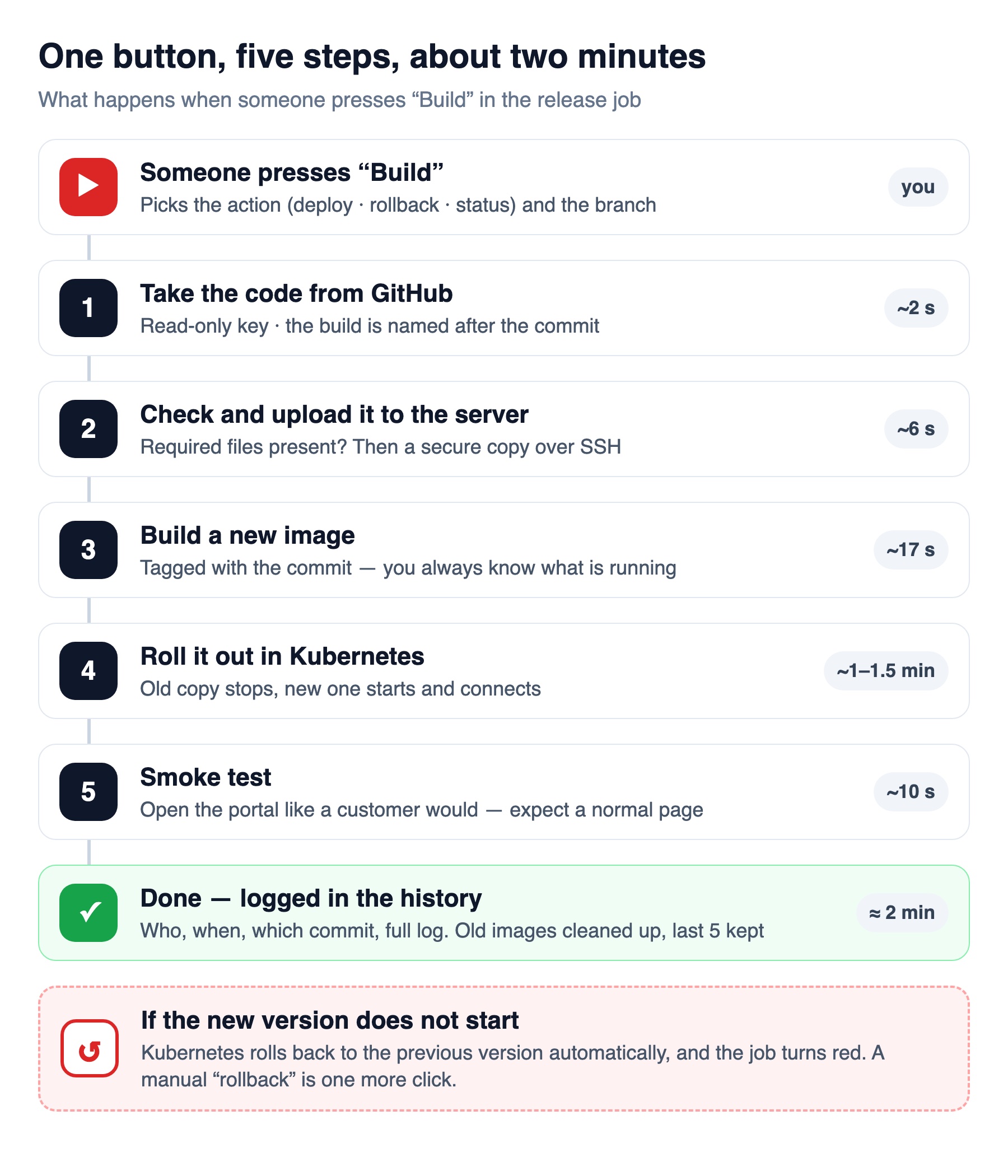
Button, not autopilot — on purpose
Jenkins can release automatically on every change. Here the owner chose manual start only: the portal takes payments and runs scheduled payment jobs, so only one copy of the app may run at a time, and a release causes about a minute of downtime. A person decides when — usually in a quiet hour — and Jenkins makes sure how is always the same.
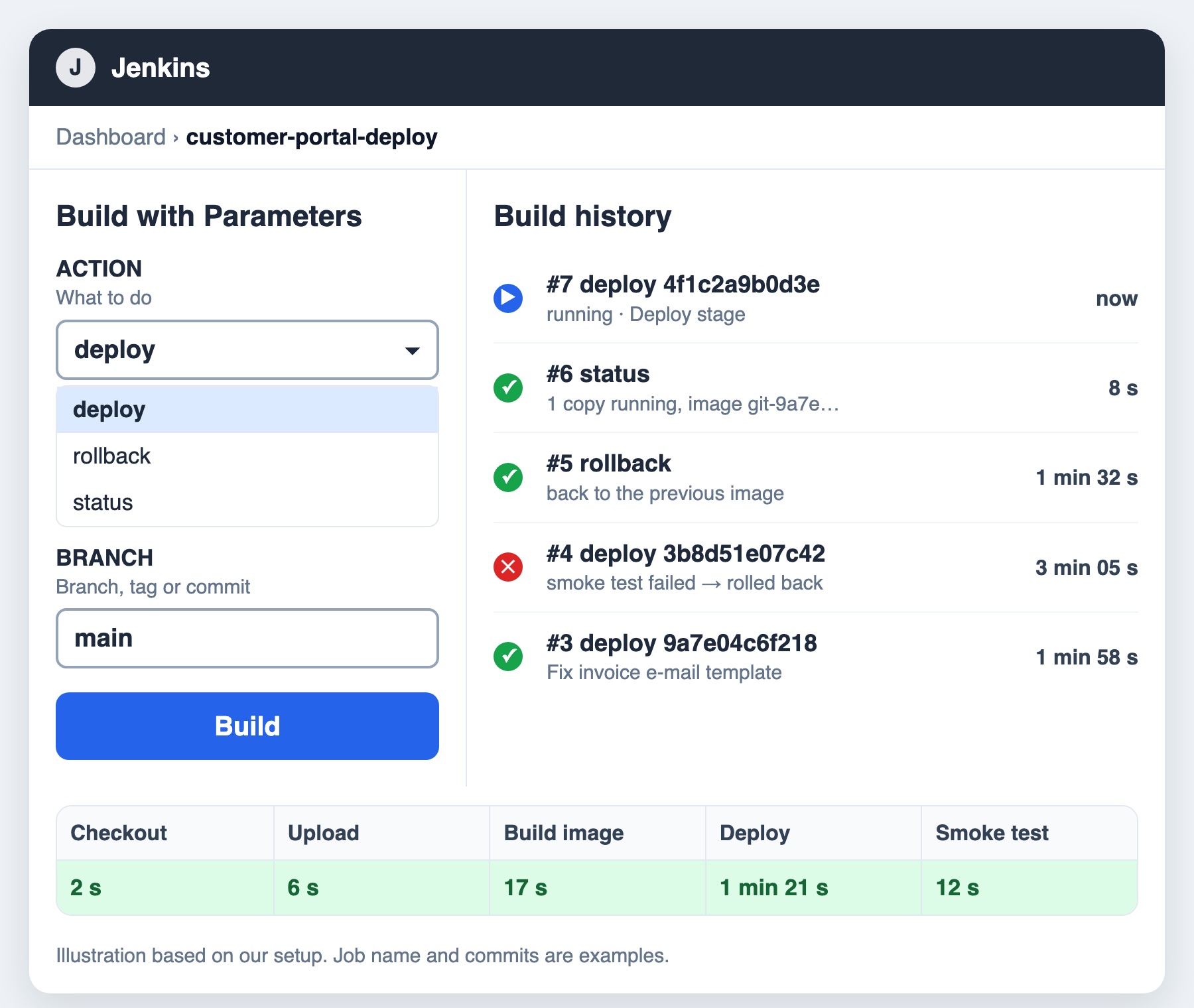
Safety first: the robot gets only the keys it needs
- Jenkins reads the code with a read-only GitHub key — it cannot change the code.
- On the production server, Jenkins’ key can run only the release script (upload, build, deploy, rollback, status, cleanup) and only from the office network. Even if Jenkins were compromised, it could not open a shell on the server.
- In Kubernetes, Jenkins’ account can change only this one app — nothing else in the cluster.
- Passwords live in Jenkins’ encrypted credentials store and in the Kubernetes Secret — never in the build log or in Git.
Result
| Before | After | |
|---|---|---|
| Who can release | One developer with admin access to production | Anyone with access to the Jenkins button |
| How long | Manual steps, “depends” | About 2 minutes, start to finish |
| Rollback | Rebuild the old version by hand | One click, or automatic if the new version fails |
| What is running? | “latest” — nobody knew which code exactly | The exact Git commit, visible in Jenkins |
| Passwords | Inside the app image | In a read-only Kubernetes Secret |
| History | None | Who, when, which version, full log |
The first release made with the button went through on the first try.
Manual button or automatic release?
| Manual button | Automatic on every change | |
|---|---|---|
| Best for | Apps with payments, one running copy, short downtime on release | Apps with good automated tests and zero-downtime releases |
| Who decides when | A person | The code: a merge to the main branch |
| Risk | Low — someone is watching | Low only if tests are strong |
| Speed of fixes | Minutes after someone presses the button | Minutes after the merge |
Many teams start with a button and switch to automatic releases once tests and zero-downtime rollouts are in place. The Jenkinsfile stays almost the same — only the trigger changes.
Jenkins, GitHub Actions or GitLab CI?
| Jenkins | GitHub Actions | GitLab CI | |
|---|---|---|---|
| Where it runs | Your own server | GitHub’s cloud, or your own runner | GitLab’s cloud, or your own runner |
| Cost | Free software; you pay for the server and upkeep | Included minutes, then pay per minute (private repositories) | Included minutes, then paid |
| Strength | Full control, works with any system, private networks | Nothing to install if the code is on GitHub | Built in if the code is on GitLab |
| Watch out for | Needs updates and plugin hygiene | Access to servers inside your network needs a self-hosted runner | Same as GitHub Actions |
Our rule of thumb: if your servers sit in a private network or in the office, or you do not want production keys in someone else’s cloud, Jenkins is a good fit. If everything is already in the cloud and on GitHub, GitHub Actions is often simpler.
Five tips if you set up Jenkins yourself
- Do not expose Jenkins to the internet. Keep it in the office network or behind a VPN or Zero Trust access.
- Give it the smallest keys possible — read-only for code, a single allowed command on servers, access to one app in Kubernetes.
- Keep the recipe in Git (Jenkinsfile), not in clicks in the web interface.
- Always have a rollback and a smoke test — a release is not done until the site opens.
- Update Jenkins and plugins on the LTS line and remove plugins you do not use.
How RedCube can help
- Set up Jenkins or GitHub Actions for your website, portal or internal app — with rollback, smoke tests and safe keys.
- Clean up “hand-made” servers and Kubernetes clusters: versions, secrets, firewalls, backups.
- Add monitoring with Grafana, so you see the effect of every release.
- Host the tools on your own servers or in the cloud — see cloud migration and optimization and managed IT services.
Not sure where your weak spots are? Start with our free IT check.
Sources: jenkins.io (documentation, LTS release line and plugin index), Kubernetes documentation on Deployments, Secrets and RBAC, GitHub Actions billing documentation. Case timings from real runs on the client’s system.
Frequently asked questions
What is Jenkins used for? +
Jenkins automates repeatable technical work: releasing new versions of websites and apps, running tests, building software, rollbacks and scheduled jobs. Every run is logged, so you know who did what and when.
Is Jenkins free? +
Yes. Jenkins is open-source software with no license fee. You pay only for the server it runs on and for the time to set it up and keep it updated.
Does Jenkins work with Kubernetes? +
Yes. Jenkins can build container images and update apps in Kubernetes, and can also run its own build agents inside a cluster. In our case it updates a Kubernetes Deployment and rolls back automatically if the new version fails.
Should releases be automatic or started by a person? +
If the app has strong automated tests and can update without downtime, automatic releases are fine. If it handles payments, can run only one copy, or needs a short downtime, a manual button with a fixed recipe is safer.
Is it safe to give Jenkins access to production? +
It is, if access is minimal: a read-only key for the code, a single allowed command on the server, permission to change only one app in Kubernetes, and Jenkins itself kept off the public internet.
Jenkins or GitHub Actions? +
GitHub Actions is simpler when the code and servers are already in the cloud. Jenkins is a better fit for servers in a private network or office, or when you want full control over where keys and builds live.
Release with one button, not a checklist
We will set up releases, rollback and monitoring for your website or app — on your servers or in the cloud.