
Blog · Smart building
How to Make an Old Split Air Conditioner Smart
Zigbee power meters, Broadlink or Tuya Zigbee IR blasters and SmartIR for Home Assistant — schedules, real on/off state and energy data without replacing the AC.
Most offices, clinics and shops have split air conditioners that are years old and work perfectly well — but only with their own remote. Nobody turns them off on Friday evening, the meeting room is cooled all weekend, and the server closet unit is noticed only when it fails.
You do not need to replace them. With an IR blaster, a power meter and the free SmartIR add-on for Home Assistant, an old split becomes a normal smart thermostat: schedules, “off when everyone leaves”, temperature control from a phone, and a real on/off state. Below is the setup we use, step by step — including the part where the Tuya Zigbee blaster needs some extra work.
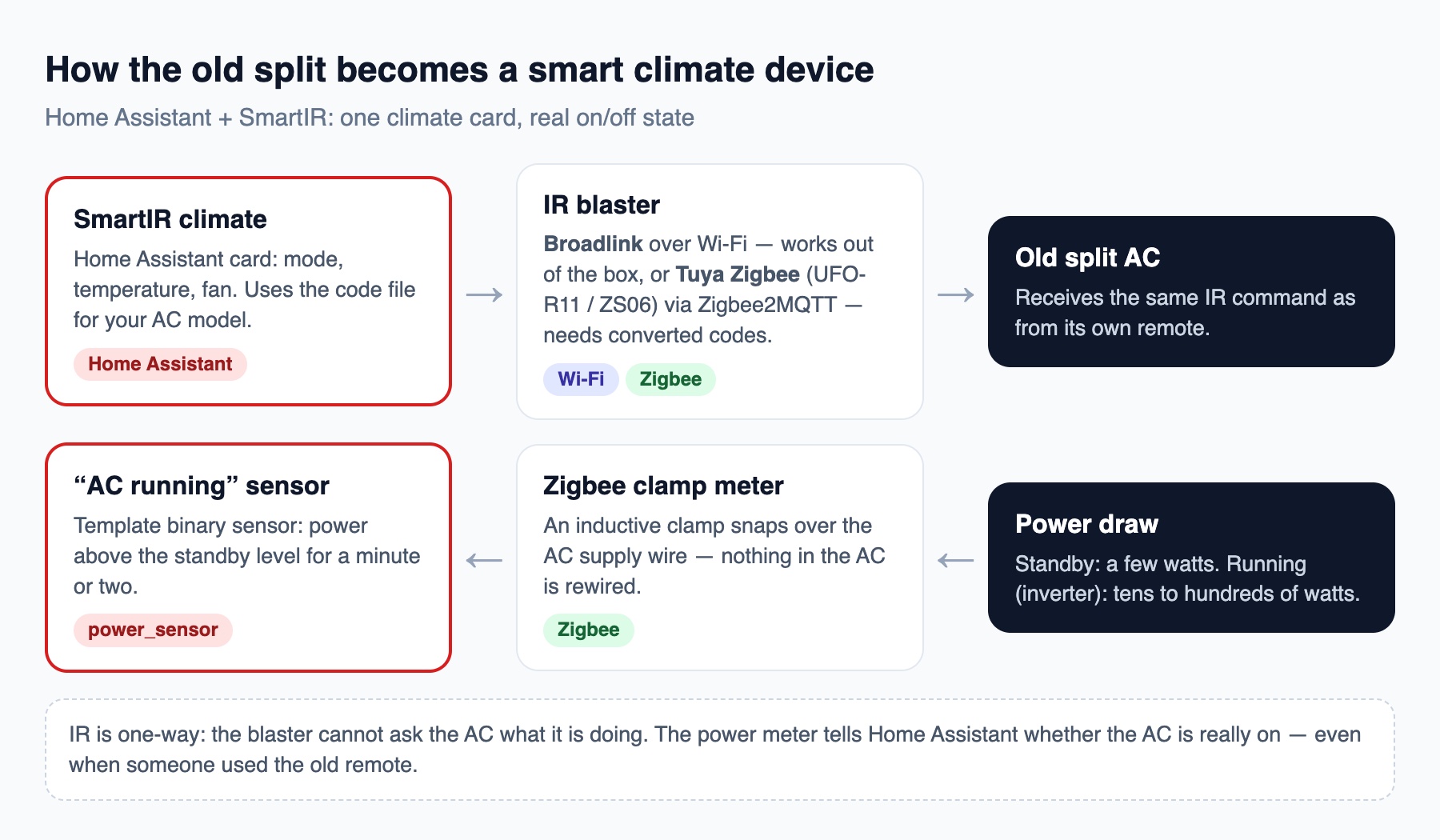
Step 1. Know whether the AC is really on: a Zigbee clamp meter
An IR remote only talks one way. The blaster sends “cool, 72°F”, but it never hears back: if the signal did not reach the unit, or someone used the old remote, Home Assistant would show the wrong state. A power meter fixes this — it tells you whether the AC is actually running.
Use an inductive clamp (current transformer) that snaps over the supply wire. Nothing in the AC is cut or rewired, the clamp works on hardwired 208/240 V mini-splits, and it measures the whole unit — compressor included.
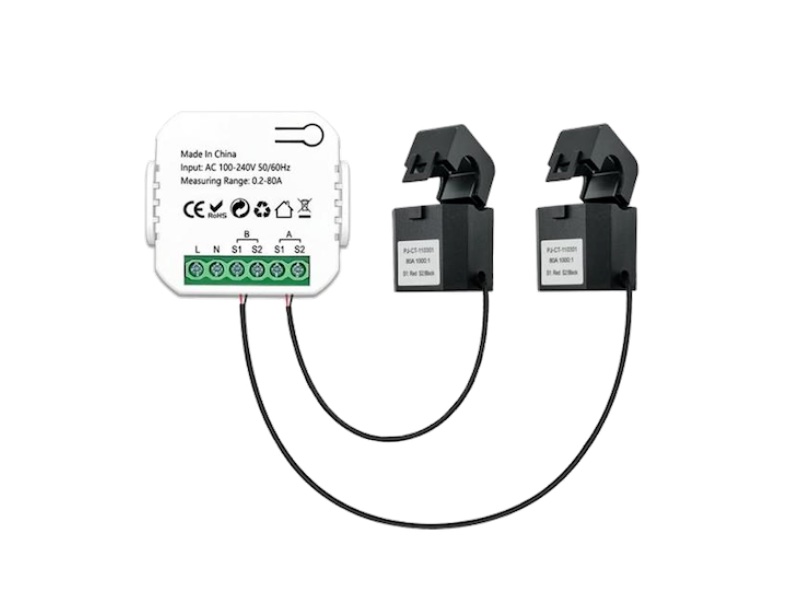
Zigbee clamp meters that work with Zigbee2MQTT:
- Tuya PJ-1203A — energy meter with 80 A current clamps; two clamps let one module watch two AC units or two circuits.
- OWON PC321 — clamp power meter for single- and three-phase circuits, 100–240 V.
The clamp goes around one conductor of the AC circuit (not the whole cable), in the panel or the outdoor disconnect box, and the meter module itself is powered from the same circuit. Have a licensed electrician install it.
Remember that inverter splits use very little power. Once the room reaches the set temperature, an inverter unit slows its compressor right down; in fan mode it may draw only tens of watts, and in standby just a few. So the rule is not “more than 500 W means on”: measure your own unit in standby and in its quietest running mode, and put the threshold between the two.
In Home Assistant, turn the power reading into an “AC running” sensor. The delay keeps it from flickering when the compressor slows down:
template:
  - binary_sensor:
      - name: "Office AC running"
        unique_id: office_ac_running
        device_class: running
        # above standby = running; measure your unit and adjust 15 W
        state: "{{ states('sensor.office_ac_clamp_power') | float(0) > 15 }}"
        delay_off: "00:03:00"
Step 2. Send the commands: an IR blaster
Option A — Broadlink over Wi-Fi (our top pick)
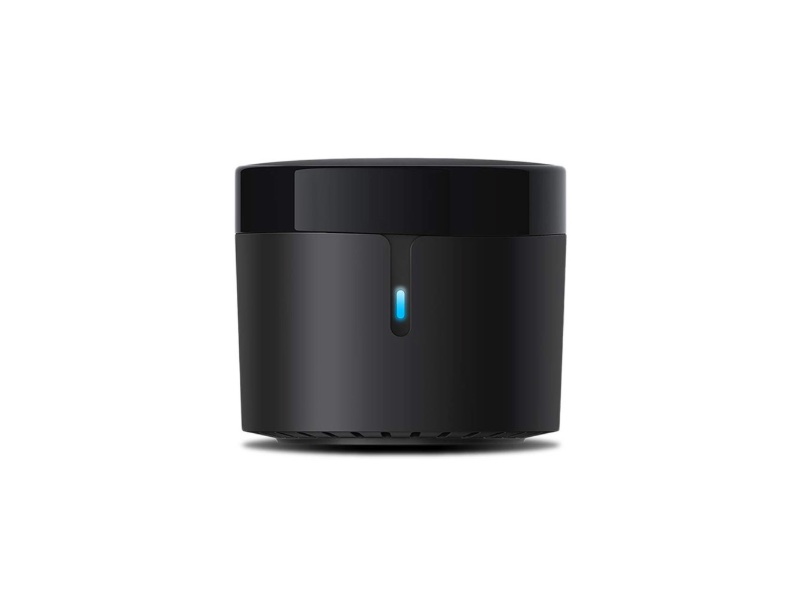
- The current round RM4 mini: a small puck powered by USB, 2.4 GHz Wi-Fi, IR all around — it covers the room from a shelf or a cabinet top.
- Home Assistant has a built-in Broadlink integration that works locally, without the cloud. Set the blaster up once in the Broadlink app and make sure it is not locked there.
- SmartIR’s code files are written in Broadlink format, so everything works out of the box: pick your AC model, and you are done.
- Put it on the IoT network (VLAN), in line of sight of the indoor unit.
Option B — Tuya Zigbee IR blaster (UFO-R11 / ZS06) via Zigbee2MQTT
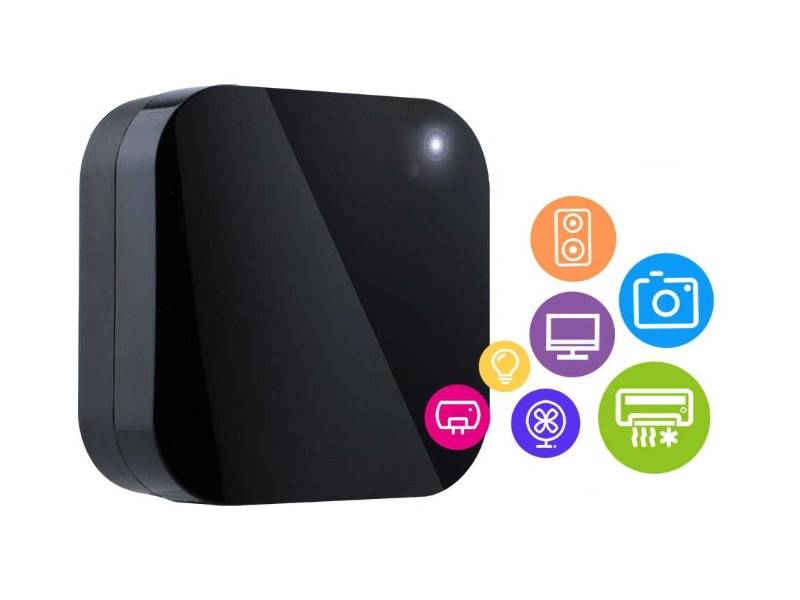
- Small Zigbee blasters: the UFO-R11 runs on batteries (good where there is no outlet), the ZS06 on USB. The Moes store lists the UFO-R11 at $24.99.
- Batteries in real life: the seller promises 3–6 months; in our installs the UFO-R11 lasts at least a month under heavy use and 2–3 months in practice. Plan battery checks, or use the USB-powered ZS06 where there is an outlet.
- Connect them through Zigbee2MQTT — it exposes “send IR code” (
ir_code_to_send) and “learned code” for these devices, which is what SmartIR needs. - No Wi-Fi client per room, and they live on the same Zigbee network as your sensors.
- The catch: they do not understand Broadlink codes. Tuya blasters use their own compressed raw format, so SmartIR’s code files must be converted first — see step 4.
Step 3. Install SmartIR and pick your AC model
- Install SmartIR from HACS (or copy it from the SmartIR repository into
custom_components) and restart Home Assistant. - Find your air conditioner in the repository’s climate list (
docs/CLIMATE.md). Each model has a device code — a number that points to a file incodes/climate/with all the commands: modes, temperatures, fan speeds. There are hundreds of brands and models. - Add the climate device. With a Broadlink blaster that is all:
smartir:

climate:
  - platform: smartir
    name: Office AC
    unique_id: office_ac
    device_code: 1180            # example — use the code for your model
    controller_data: remote.office_broadlink
    temperature_sensor: sensor.office_temperature
    humidity_sensor: sensor.office_humidity
    power_sensor: binary_sensor.office_ac_running
    power_sensor_restore_state: true
The power_sensor line is where the power meter from step 1 comes in: SmartIR uses it as the sign that the unit really runs, so the card shows “off” when the AC is off — even if someone switched it with the old remote.
Test every mode before you trust it. If one model file does not match your unit, try a neighboring code for the same brand.
Step 4. The Tuya Zigbee blaster: convert the codes
With a Tuya blaster you need to do a little dance. SmartIR’s files contain Broadlink Base64 codes; the Tuya blaster expects raw timings in its own compressed format, and SmartIR has to send them over MQTT instead of a Broadlink remote.
- Pair the blaster with Zigbee2MQTT and give it a clear name, for example
office_ir. - Take the code file for your AC from the SmartIR repository (for example
codes/climate/1180.json). - Convert it with the online converter Convert Broadlink Codes to Raw MQTT Format: paste the Broadlink file, get the same file with codes for the Tuya blaster. Offline alternatives are command-line converters such as smartir-tuya-converter (now continued as tuya-ir).
- Check the header of the converted file: the controller and the encoding must say MQTT and Raw:
"supportedController": "MQTT", "commandsEncoding": "Raw", - Save it under a new number that is not used by SmartIR, for example
codes/climate/9990.json, and keep a copy outside the add-on folder — an update can overwrite it. - Point SmartIR at the Zigbee2MQTT topic instead of a remote entity:
climate: - platform: smartir name: Office AC unique_id: office_ac_zigbee device_code: 9990 controller_data: zigbee2mqtt/office_ir/set/ir_code_to_send temperature_sensor: sensor.office_temperature power_sensor: binary_sensor.office_ac_running power_sensor_restore_state: true - Test one command by hand first: in Zigbee2MQTT, paste one converted code into the blaster’s “IR code to send” field. If the AC beeps, the conversion works for your model; if not, learn the same button from the original remote (the blaster shows it as “learned IR code”) and compare.
Converted codes usually work, but not for every model — test each mode and temperature you plan to use in automations.
What you get
- Schedules: on 30 minutes before opening, off after closing and on weekends.
- Off when the room is empty — with a presence sensor in the meeting room or office.
- Off when a window or door is left open (Zigbee contact sensor).
- Server closet watch: an alert when the temperature rises or the “AC running” sensor shows the unit stopped.
- Energy data: the power meter shows how many kWh each unit really uses.
Tips from our installs
- Mount the blaster in line of sight of the indoor unit; one blaster per room.
- Keep Broadlink blasters on the IoT network, and plan Zigbee and Wi-Fi channels together — see why Zigbee drops when Wi-Fi sits on the same channel.
- Run automations locally in Home Assistant, so the AC keeps following the schedule during an internet outage.
- Leave the original remotes in place: the power sensor keeps Home Assistant in sync when people use them.
We set this up for offices, dental practices and shops and restaurants in Delaware and Pennsylvania — together with the network it runs on.
Case: hotels, short-term rentals and guest rooms
In hospitality, the AC runs in empty rooms for hours: the guest left for the beach, the room was not sold tonight, the balcony door is open. The same setup — IR blaster, power meter and SmartIR — plus two more signals turns every old split into a room controller.
- The door lock tells you the guest arrived. A smart lock reports every unlock — by guest code, card, app or key — to Home Assistant. We use Yale smart locks: in our installs they have never let us down. Unlock with the guest’s code = the guest is in: switch the AC from eco to comfort.
- The presence sensor tells you the guest is still there. A radar sensor sees a person sleeping or reading, so the AC never switches off on a guest. See our comparison of presence sensors on Zigbee and Wi-Fi to pick one per room.
- Nobody inside for 30–60 minutes and the door locked → eco mode. Not “off”: a few degrees warmer in summer keeps the room comfortable to come back to and keeps humidity under control.
- Check-out or room not booked → eco or off; before the next arrival the room is cooled in advance, so the guest walks into a comfortable room.
- Balcony door or window open (Zigbee contact sensor) → AC off after a minute, with a polite note on the room screen or in the guest app if you have one.
- Energy per room: the power meter shows kWh per room and per stay — useful for owners of rentals and for spotting a unit that needs service.
# idea of the main automation (Home Assistant)
# guest unlocks the door  → climate: comfort (e.g. 74°F)
# no presence for 45 min and door locked → climate: eco (e.g. 79°F)
# humidity above 60% for 30 min in an empty room → climate: dry, alert maintenance if it stays high
# window/balcony door open for 1 min → climate: off
Do not forget temperature and humidity sensors
SmartIR needs a room temperature to show the real temperature on the card, and in a humid climate humidity matters as much as temperature. An empty room with the AC off can reach high humidity within days — and then you are fighting mold in the walls, closets and mattresses. The EPA advises keeping indoor humidity below 60%, ideally between 30% and 50% (EPA: A Brief Guide to Mold, Moisture and Your Home). A Zigbee sensor in every room lets automations run the AC in dry mode when humidity climbs, even when nobody is there.
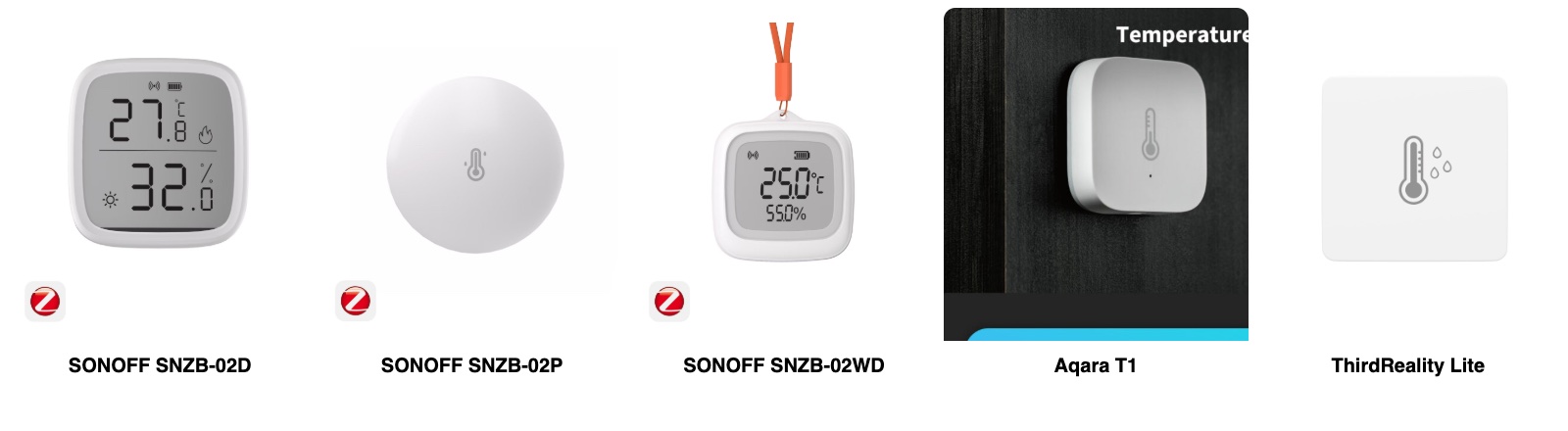
| Sensor | Accuracy | Battery | Notes | Store price* |
|---|---|---|---|---|
| SONOFF SNZB-02D | ±0.2 °C, ±2% RH | CR2450 | Large LCD, updates every 5 s — best value for rooms | $13.90 |
| SONOFF SNZB-02P | ±0.2 °C, ±2% RH | CR2477, up to 4 years | No display, small and discreet — good for guest rooms | $16.90 |
| SONOFF SNZB-02WD | ±0.2 °C, ±2% RH | CR2477 | IP65 waterproof, works to 100% RH — bathrooms, basements, terraces | $19.90 |
| Aqara T1 | ±0.3 °C, ±3% RH (retailer figures) | CR2032 | Also measures air pressure; Aqara app needs an Aqara hub, Zigbee2MQTT works directly | about $20 |
| ThirdReality Lite | ±0.3 °C, ±2% RH | — | Indoor only, simple and US-available | $19.99 |
* Prices in the manufacturers’ stores at the time of writing. Our pick for price and quality: SONOFF — SNZB-02D for rooms where people like to see the numbers, SNZB-02P for discreet installs, SNZB-02WD for wet areas.
- Mount the sensor away from the AC’s air stream, the bathroom door and direct sun — at about bed or desk height.
- Use the room sensor as SmartIR’s
temperature_sensorandhumidity_sensor, and alert maintenance when humidity stays above 60%.
Frequently asked questions
Can any split air conditioner be made smart this way? +
Almost any unit with an infrared remote. SmartIR has code files for hundreds of models; if yours is missing, the codes can be learned from the original remote.
Broadlink or Tuya Zigbee IR blaster? +
Broadlink works with SmartIR out of the box and is our first choice. A Tuya Zigbee blaster (UFO-R11, ZS06) fits where you already run Zigbee or need batteries, but it must go through Zigbee2MQTT and needs converted codes.
Why do I need a power meter? +
IR is one-way. A Zigbee clamp meter on the AC supply tells Home Assistant whether the AC is really on, so the state stays right even when a command is missed or someone uses the old remote.
What threshold should I use for an inverter AC? +
Measure your unit: note the standby power and the lowest power while it runs, and set the threshold between them, with a delay of a few minutes before “off”. Inverter units can drop to very low power once the room reaches temperature.
Where does the clamp meter go? +
Around one conductor of the AC circuit — in the electrical panel or the outdoor disconnect box. Nothing in the AC is rewired, but the meter module is powered from the same circuit, so a licensed electrician should install it.
Why monitor humidity in rooms with an AC? +
In a humid climate an empty room can reach high humidity within days, and mold follows. A Zigbee sensor lets the AC run in dry mode when humidity stays above 60% — the EPA advises staying below 60%, ideally 30–50%.
How does the system know a hotel guest is in the room? +
Two signals: the smart lock reports the guest’s unlock, and a presence sensor confirms someone is still inside. Together they switch the AC between comfort and eco without guessing.
Old ACs, new control
We make existing split units smart, connect them to schedules and presence sensors, and put it all on a secure network.