

Projects
RED Print: Warehouse Scales, Dimensioners and Cameras Connected to Your Cloud WMS
RED Print sends weight, dimensions and a photo from Cubiscan, Mettler Toledo and DYMO devices to your cloud WMS in one click — faster receiving and shipping, no typing errors.
RED Print is a RedCube product that connects the devices on your warehouse floor — dimensioners, shipping scales, cameras and label printers — to your cloud software. A small agent runs on the station PC, talks to the devices over USB, COM port or the local network, and makes them available to your WMS, ERP or shipping app through a secure cloud API. Weight, dimensions and a photo of the item land in your system in one click, with nothing typed by hand.
Product at a Glance
- One click returns weight, length × width × height and a photo of the item straight into your WMS
- Native support for Cubiscan dimensioners, Mettler Toledo and DYMO USB shipping scales
- IP cameras take a photo of every measured item automatically, stored in the cloud and linked to the record
- Optional AI label recognition: tracking number, sender and recipient read from the photo of the label
- Labels and documents print back to the local printer at the same station
- Devices and station settings are managed from the cloud; the agent updates itself
- Runs on a Windows PC or on a compact Raspberry Pi next to the scale
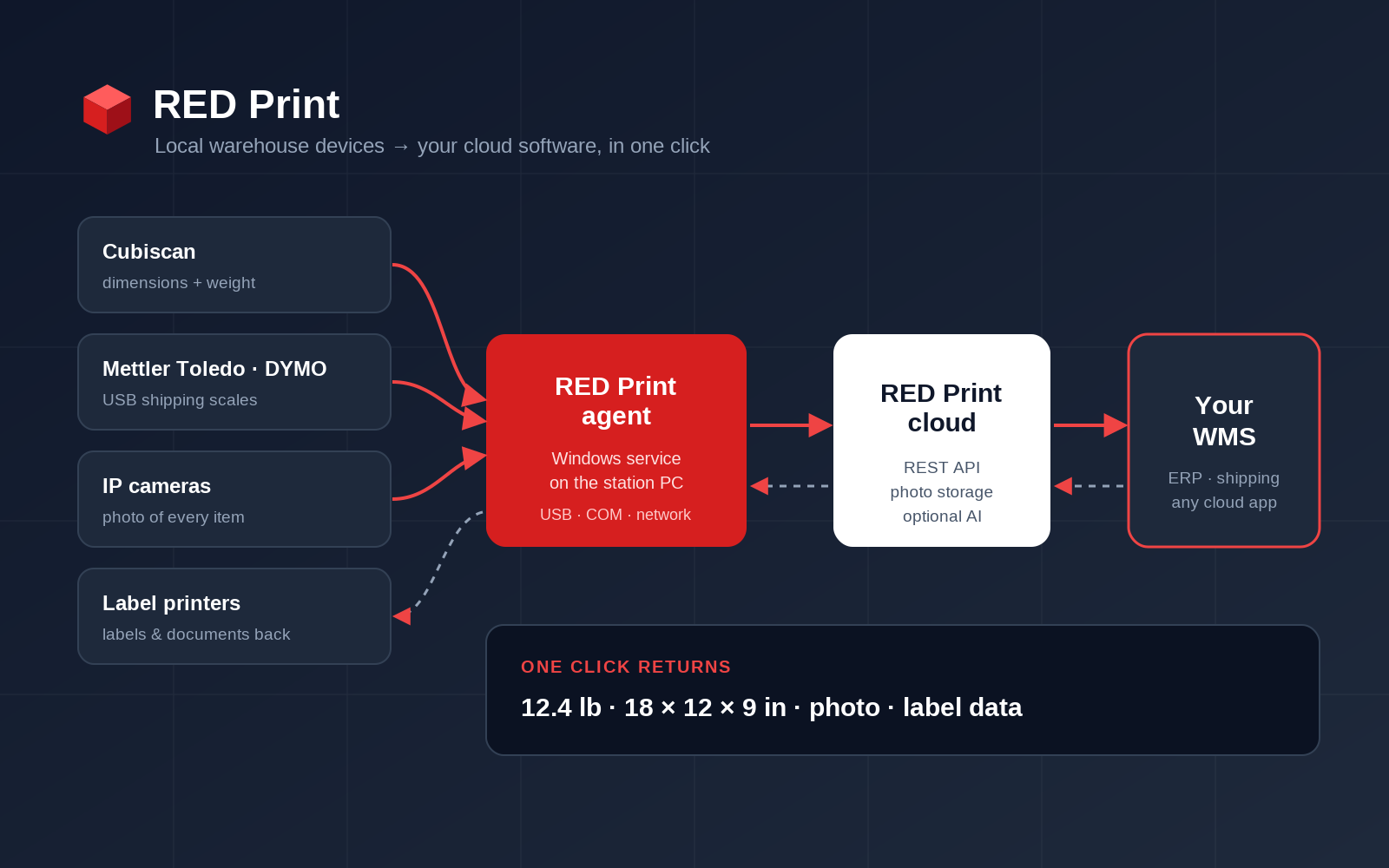
What changes at the station
- 1 click
- weight, size and photo captured
- ~10×
- faster receiving per parcel
- 0
- values typed by hand
- 3
- device families: Cubiscan, Mettler Toledo, DYMO
Supported devices
What RED Print connects
Devices stay where they are. RED Print makes them part of your cloud workflow.
Cubiscan dimensioners
Weight and all three dimensions in one measurement, over the network or a COM port. Optional auto-measure: a new item on the platform is measured and recorded by itself.
Mettler Toledo & DYMO scales
USB shipping scales report the live weight to the cloud the moment it settles — no reading the display, no rounding, no unit mix-ups.
IP cameras
Each measurement can trigger a photo of the item on the scale. The picture is saved to cloud storage and attached to the record in your WMS.
AI label recognition
Optional: the photo of the shipping label is read by AI — tracking number, carrier, sender, recipient — and matched to the right customer or order.
Label printers
Your cloud app sends labels and documents to the printer at the same station; jobs wait if the PC is briefly offline.
Your software
A REST API compatible with PrintNode lets any WMS, ERP or shipping application read devices and print with a few lines of code.
How it works
Install the agent
A Windows service on the station PC — or on a Raspberry Pi — finds the connected scales, dimensioners, cameras and printers.
Devices appear in the cloud
Every station and device is visible in the RED Print cloud panel; settings are managed remotely.
One click in your WMS
The operator scans the item and clicks Measure. Weight, dimensions and the photo come back in seconds.
Data lands in the record
Values and the photo are saved to the item, order or parcel — and the label prints at the same station.
Inside the RED Print Cloud Panel
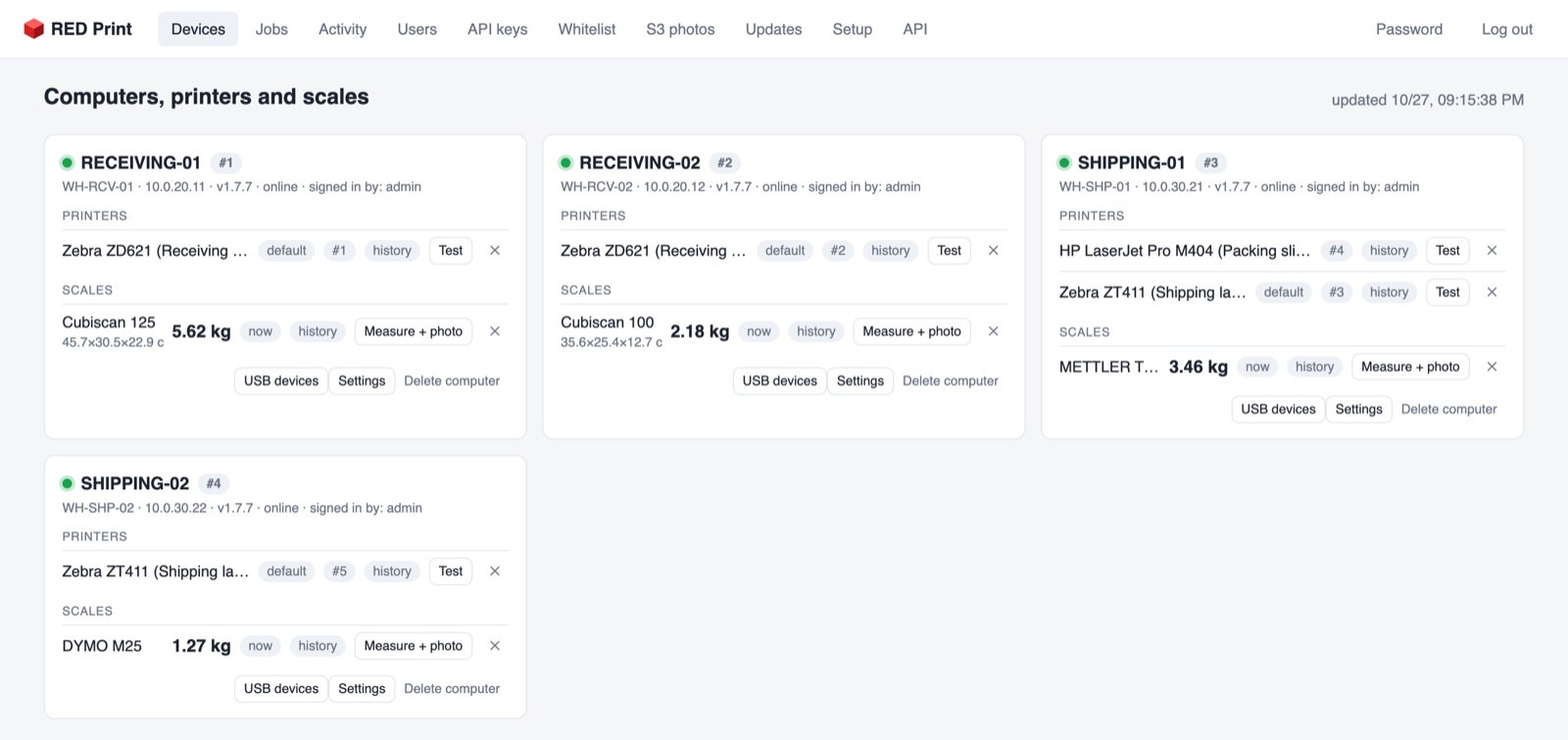
Every station, printer, scale and dimensioner is visible in one place — online status, live weight, the last Cubiscan dimensions and a Measure + photo button for a test from the office.
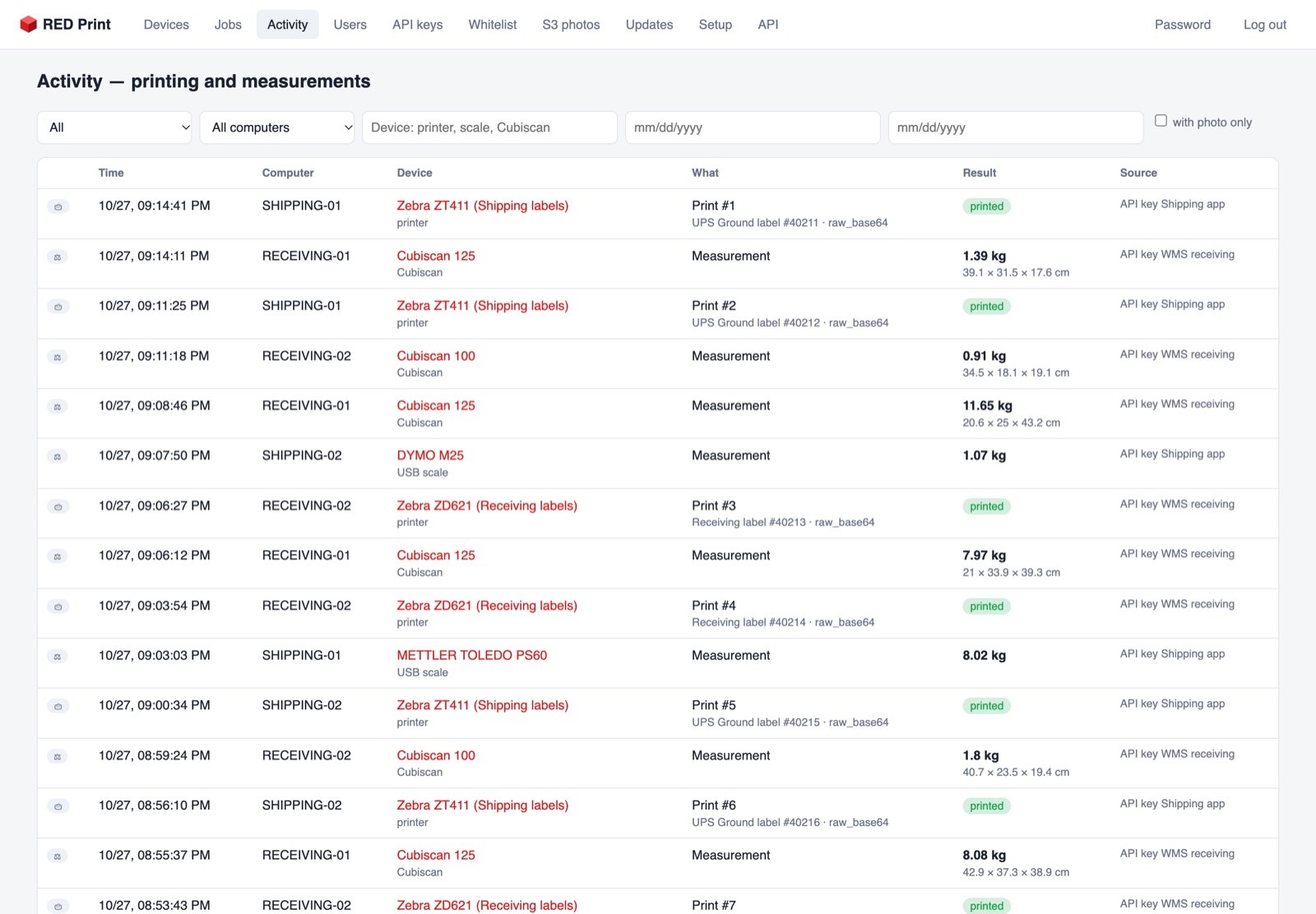
Every measurement and every label on record
The activity log shows each weight, size and print job with the station, the device and the application that requested it — useful for audits, disputes and carrier adjustments.
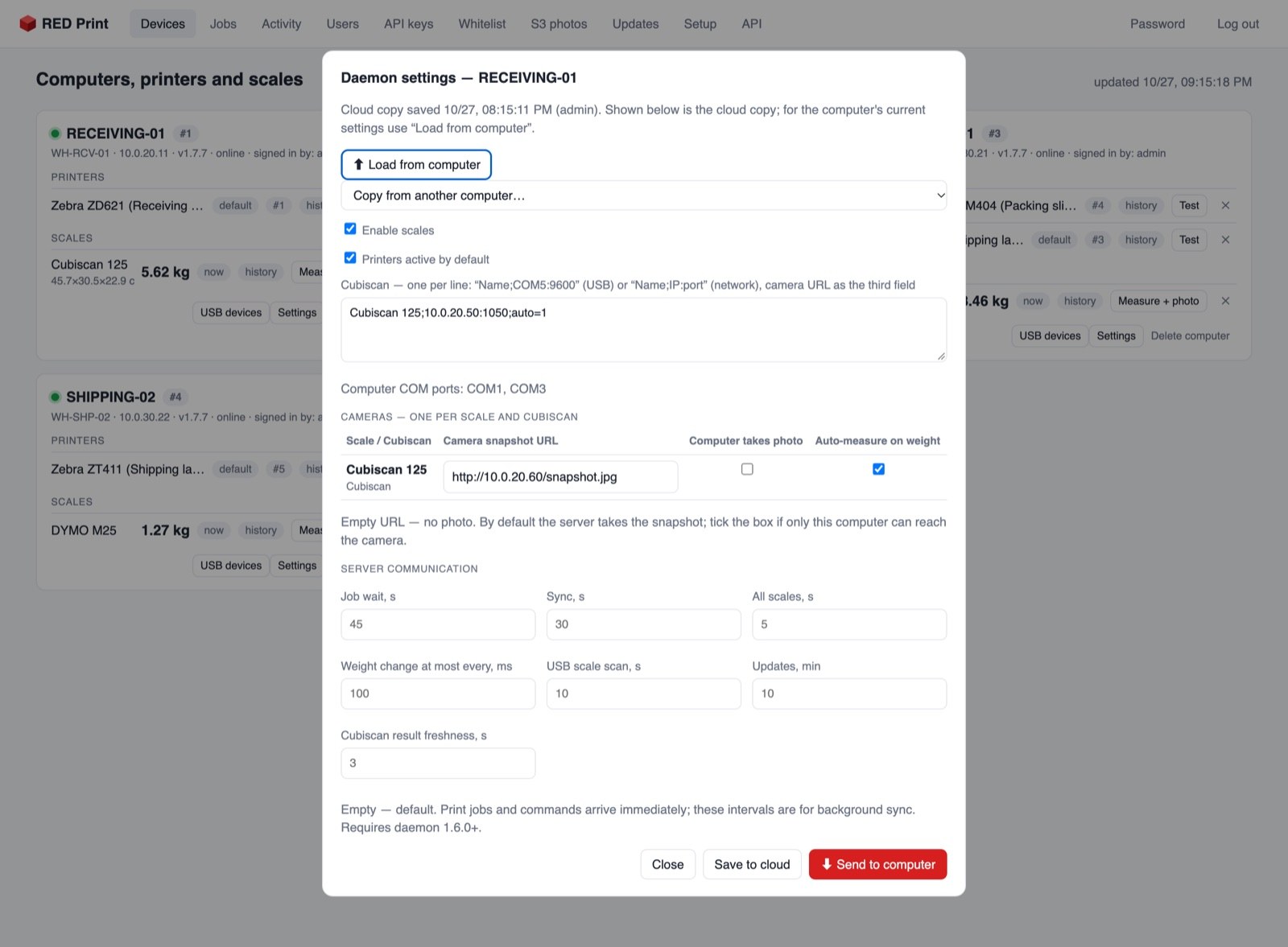
Stations configured from the cloud
Connect a Cubiscan by IP or COM port, assign the camera that photographs each item and turn on auto-measure — then push the settings to the station without visiting it.
Case 1: Inbound Receiving and Dimensioning
A parcel arrives at the receiving station. The warehouse needs its weight, its dimensions and a photo of the item in the WMS — for storage planning, billing and claims.
Manually
- Put the parcel on the scale, read the display and type the weight into the WMS.
- Measure length, width and height with a tape and type three more numbers.
- Take a photo with a phone or a separate camera, then find the file and attach it to the right record.
- Copy the tracking number and sender from the label by hand if the barcode does not carry them.
With RED Print
- Scan the parcel and place it on the Cubiscan.
- Click Measure. Weight, dimensions and the photo from the camera above the station arrive in the WMS together.
- If needed, AI reads the label from the same photo and fills in tracking, carrier and sender automatically.
| Per parcel | Manual | RED Print |
|---|---|---|
| Weigh and enter weight | ≈ 10 s | ≈ 10 s (scan + one click) |
| Measure and enter L × W × H | ≈ 50 s | |
| Photo and attach to the record | ≈ 40 s | |
| Total | ≈ 100 s | ≈ 10 s |
| 400 parcels a day | ≈ 11 labor hours | ≈ 1 labor hour |
| Values typed by hand | 4 per parcel + a photo to match | none |
About 10 labor hours a day saved at 400 parcels — roughly 200 hours a month. Fewer errors matter as much as speed: manual keying is commonly estimated at around 1 mistake per 100 entries. With four numbers per parcel that is about one parcel in 25 with a wrong value — some 16 parcels a day at 400 — plus inches typed as centimeters, ounces as pounds and photos attached to the wrong item. With RED Print nothing is retyped: the values come from the device and the photo is linked to the record automatically, so these errors disappear.
Case 2: Weighing Parcels Ready to Ship
Outbound parcels are packed and need a final weight — and often dimensions — before the shipping label is bought and printed. A wrong weight means a wrong postage price, and carriers bill the difference later as adjustments.
Manually
- Put the parcel on the scale, read the display and type the weight into the shipping software.
- For dimensional-weight pricing, measure the box with a tape and type three more numbers.
- Buy the label and send it to the printer.
With RED Print
- Scan the order barcode and place the parcel on the Mettler Toledo or DYMO scale — or on a Cubiscan when dimensions matter.
- The weight (and dimensions) are already in the shipping screen; the label prints at the same station.
- Optionally a photo of the packed parcel is saved with the order as proof of what was shipped.
| Per parcel | Manual | RED Print |
|---|---|---|
| Weight only | ≈ 15 s | ≈ 4 s |
| Weight + dimensions | ≈ 60 s | ≈ 6 s |
| 600 parcels a day, weight only | ≈ 2.5 labor hours | ≈ 0.7 labor hours |
| 600 parcels a day, weight + dimensions | ≈ 10 labor hours | ≈ 1 labor hour |
Up to 9 labor hours a day saved at 600 parcels when dimensions are needed. At about 1 keying mistake per 100 entries, a manual line shipping 600 parcels a day sends out several parcels daily with the wrong weight or size — each one a potential carrier adjustment, a chargeback or postage paid twice. With RED Print the weight comes from the scale and the dimensions from the Cubiscan, so the label is bought for what is actually in the box.
Times and error rates above are typical estimates for illustration; actual numbers depend on your stations, staff and parcel mix. We are happy to measure your current process before and after.
Why RED Print
What makes it different
- Cubiscan support out of the box — network or COM port
- Mettler Toledo and DYMO USB shipping scales
- Auto-measure: a new item on the Cubiscan is recorded by itself
- A photo of every measurement, stored in the cloud
- Optional AI reading of shipping labels
- Print jobs wait instead of failing when a PC goes offline
- Stations configured and updated from the cloud
- PrintNode-compatible API — easy to plug into existing software
- Windows PC or Raspberry Pi at the station
Questions about RED Print
Do we have to change our WMS? +
Which devices are supported? +
What does the station need? +
Is AI label recognition required? +
We already use PrintNode. Can we switch? +
Related Projects
- RedCube OS: browser workstations managed from one screen, with RED Print built in
- RedCube CRM: from the first e-mail to the paid invoice
- Automated parcel processing line with AI label recognition
- Warehouse video surveillance integrated with the WMS
- Fault-tolerant warehouse network
Services Used in This Project
Warehouse & manufacturing IT · Managed IT services · Network installation